AI-Powered Intelligence Without the Cloud: Global Watch's Privacy-First Approach
Every time you paste a sensitive document into ChatGPT, that data touches someone else’s servers. For intelligence analysts, security researchers, and anyone handling sensitive geopolitical information, that’s not just inconvenient. It’s a risk.
Global Watch takes a different approach. Every AI feature in the platform can run entirely on your own hardware, with no data leaving your machine.
The Problem with Cloud-Based Intelligence Tools
Most AI-powered analysis tools follow the same pattern: your data goes up to a cloud API, gets processed, and the result comes back. This works fine for writing emails. It’s problematic when you’re analyzing:
- Military deployment patterns
- Classified or sensitive government communications
- Corporate intelligence on merger targets
- Supply chain vulnerabilities in critical infrastructure
- Threat assessments for physical security operations
Even with enterprise API agreements, the data transits networks you don’t control, gets logged in systems you can’t audit, and exists on servers in jurisdictions that may not align with your requirements.
Global Watch’s 4-Tier AI Architecture
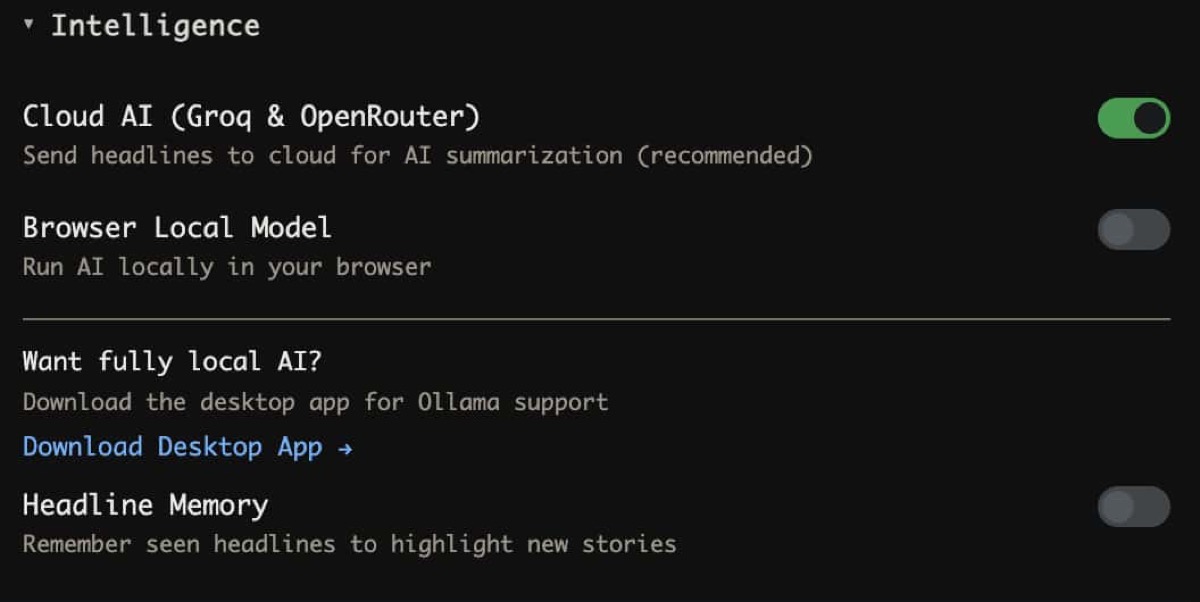
Global Watch solves this with a 4-tier LLM fallback chain that starts local and only reaches for the cloud if you explicitly allow it:
Tier 1: Local LLMs (Ollama / LM Studio)
Your first and most private option. Install Ollama or LM Studio on your machine, download a model (Llama 3.1, Mistral, Phi, etc.), and point Global Watch at your local instance.
What runs locally:
- World Brief generation: Daily intelligence summaries synthesized from current headlines
- Country dossier analysis: AI-written assessments for any country’s current situation
- Threat classification: Categorizing news events by threat type and severity
- AI Deduction: Interactive geopolitical forecasting grounded in live data
The desktop app (Tauri) discovers your local Ollama instance automatically. No configuration needed. Just install Ollama, pull a model, and open Global Watch.
Tier 2: Groq (Llama 3.1 8B)
If you want cloud speed with open-source models, Groq runs Llama 3.1 at extremely fast inference speeds. You need a free Groq API key, which is stored in your OS keychain (macOS Keychain, Windows Credential Manager) via the desktop app.
Tier 3: OpenRouter
A fallback provider that gives you access to multiple models (Claude, GPT-4, Mixtral, etc.) through a single API key. Use this if your preferred model isn’t available through Groq.
Tier 4: Browser-Based T5 (Transformers.js)
The ultimate fallback. A T5 model runs entirely in your browser via WebAssembly and Web Workers. No API key, no network request, no server. The model weights are cached locally after first download.
This tier is limited (T5 is smaller than Llama 3.1), but it means Global Watch’s AI features always work, even without internet access.
In-Browser Machine Learning
Beyond the LLM tiers, Global Watch runs several ML pipelines entirely in your browser:
Named Entity Recognition (NER)
Extracts people, organizations, locations, and dates from news headlines. Runs in a Web Worker using Transformers.js with ONNX models. Never touches a server.
Sentiment Analysis
Classifies headline sentiment to detect shifts in media tone about countries, leaders, or events. This feeds into the information velocity component of the CII (Country Instability Index).
Semantic Search (RAG)
Global Watch’s Headline Memory feature builds a local semantic index of up to 5,000 headlines using ONNX embeddings stored in IndexedDB. When you ask the AI about a topic, it retrieves relevant headlines from your local index for grounded, cited responses.
This is a full Retrieval-Augmented Generation pipeline running in your browser. No vector database subscription. No cloud embedding API.
3-Stage Threat Classification
The threat pipeline processes every incoming headline through:
- Keyword matcher (instant, rule-based)
- Browser ML classifier (Transformers.js, runs locally)
- LLM classifier (your chosen tier)
The first two stages always run locally. The third stage uses whichever LLM tier you’ve configured.
The Desktop App: Full Offline Operation
Global Watch’s Tauri desktop app (available for macOS, Windows, and Linux) takes privacy further:
- OS Keychain Integration: API keys are stored in your operating system’s secure credential store, not in config files or browser storage
- Local Node.js Sidecar: A bundled Node.js process handles data fetching and processing locally, including API calls that can’t run in a browser (due to CORS or TLS requirements)
- Offline Map Caching: The Progressive Web App caches up to 500 map tiles for offline viewing
- No Telemetry: The desktop app sends zero analytics or usage data
With Ollama installed alongside the desktop app, you have a fully air-gapped intelligence dashboard. Connect to the internet when you want fresh data, disconnect when you want to analyze in private.
Practical Setup: From Zero to Private Intelligence
Step 1: Install Ollama
curl -fsSL https://ollama.ai/install.sh | sh
ollama pull llama3.1
Step 2: Open Global Watch
Navigate to globalwatch.vercel.app or install the desktop app from GitHub releases.
Step 3: Configure AI
Global Watch auto-detects your local Ollama instance. Open any country dossier or the World Brief panel and the AI analysis generates locally.
Step 4: Enable Headline Memory (Optional)
Opt in to the RAG feature. Global Watch will build a local vector index of headlines you’ve seen, giving the AI context for more grounded analysis.
Total setup time: under 5 minutes. Total data sent to external servers for AI processing: zero.
Who Needs Private Intelligence Analysis?
Government Analysts: Classified environments can’t send data to commercial AI APIs. Global Watch with Ollama runs entirely within your network boundary.
Corporate Security Teams: Analyzing threats to executives, facilities, or supply chains often involves information that shouldn’t leave the corporate network.
Journalists in Hostile Environments: Reporters covering authoritarian regimes need tools that don’t create a trail of API calls linking them to specific intelligence queries.
Academic Researchers: IRB (Institutional Review Board) requirements may prohibit sending research data to third-party AI services. Local processing satisfies these constraints.
Financial Compliance: Material non-public information (MNPI) requirements mean certain geopolitical analysis can’t transit external servers.
Open Source: Trust Through Transparency
You don’t have to take our word for the privacy claims. Global Watch is fully open source under AGPL-3.0. Every network call, every data flow, every AI prompt is in the codebase for you to audit.
The proto-first API architecture (92 proto files, 22 typed services) means even the API contracts are transparent. You can see exactly what data each endpoint expects and returns.
Run intelligence analysis on your own terms at globalwatch.vercel.app. Install Ollama for fully private AI. No login, no tracking, no compromise.